
How to Beat the Adaptive Trap in Digital SAT Math Module 2: Advanced Pacing Strategy
Last Updated: October 2026 | By EdFlik Education Team
For high school students preparing to take the Digital SAT—whether testing at international test centers across Dubai, Abu Dhabi, or anywhere globally—the transition to a fully adaptive digital format has fundamentally transformed test-day strategy. Gone are the days of paper booklets where you could breeze through questions in any order or flip back and forth at will.
Today, the Digital SAT Math section is divided into two distinct, adaptively routed modules:
- Module 1 (Routing Module): A broad mix of easy, medium, and hard questions that test your foundational proficiency across Algebra, Advanced Math, Problem-Solving, and Geometry/Trigonometry.
- Module 2 (The Adaptive Module): Your performance on Module 1 determines which version of Module 2 you receive. If you score well on Module 1, you are routed to the hard/advanced Module 2, which is the only path that unlocks the maximum possible score of 800. If you struggle on Module 1, you are routed to the easier module, capping your maximum score ceiling significantly.
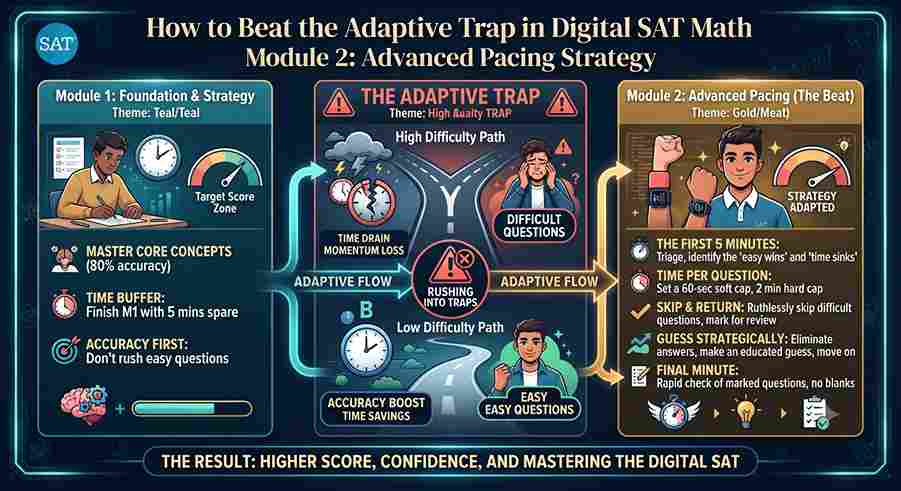
However, once inside Module 2 (Advanced), students frequently fall into what elite test-prep educators call the "Adaptive Trap." Because Module 2 packs a relentless concentration of high-difficulty, multi-step algebraic word problems, complex function transformations, and rigorous geometry traps into a tight 35-minute window, panic sets in. Students get bogged down on question 4 or 5, burn 8 minutes trying to untangle an algebraic labyrinth, and watch their time evaporate—leaving them rushing blindly through the final third of the test.
In this comprehensive, expert-authored masterclass guide, our test-prep strategists break down the mechanics of the adaptive trap, reveal advanced pacing blueprints, and provide tactical execution frameworks to help you conquer Module 2 and secure a top Math score.
Part 1: Anatomy of the Adaptive Trap — Why Module 2 Breaks Students
To beat the adaptive trap, you must first understand how the College Board constructs Module 2 (Advanced).
Unlike traditional tests where difficulty increases gradually from question 1 to question 22, the digital adaptive algorithm front-loads or clusters high-cognitive-load questions designed to test your resilience and efficiency.
The Psychological and Tactical Descent:
- The False Sense of Security in Module 1: Many strong students finish Math Module 1 with 5 to 7 minutes to spare, feeling confident. This lulls them into a relaxed pacing mindset.
- The Shock Wave in Module 2: Question 1 or 2 of Advanced Module 2 hits you immediately with a convoluted system of nonlinear equations or an abstract function notation problem requiring three distinct algebraic substitutions.
- The Sunk Cost Fallacy: Because students know this is the hard module, pride kicks in. When a problem refuses to yield after 3 minutes, the ego whispers: "I can't skip this; I'm aiming for an 800." You spend 4 more minutes wrestling it, successfully solving it, but sacrificing the time buffer needed for the remaining questions.
- The Panic Cascade: By question 12, you realize you only have 8 minutes left for 10 questions. Adrenaline spikes, reading comprehension drops, careless calculation errors multiply, and your score plummets.
Part 2: The 35-Minute Advanced Pacing Blueprint
To prevent the panic cascade, you must replace linear pacing with strategic triaging. You have 35 minutes to answer 22 questions. That averages out to roughly 1 minute and 35 seconds per question, but spending equal time on every question is a recipe for disaster.
The Three-Pass Strategy for Module 2:
- Pass 1: The Quick-Kill Sweep (Minutes 0–12 | Questions 1–22)
- Objective: Move rapidly through the entire module, answering every single question that you instantly recognize and can solve in under 60–90 seconds.
- Rule: If you read a question and do not immediately see a clear path to the solution within 30 seconds, flag it and skip it immediately. Do not fall into the sunk cost trap.
- Pass 2: The Medium-Depth Attack (Minutes 12–28 | Flagged Questions)
- Objective: Return to the questions you flagged in Pass 1. These are typically multi-step algebra problems, geometry word problems, or statistics questions that require careful setup.
- Rule: Utilize your Desmos graphing calculator aggressively to verify solutions, test answer choices (backsolving), or find intersection points visually.
- Pass 3: The Hail Mary & Buffer Verification (Minutes 28–35 | Remaining & Review)
- Objective: Tackle any remaining stubborn questions or double-check calculations. Because there is no penalty for guessing on the digital SAT, ensure every single bubble/box is filled before the clock hits zero.
Part 3: Weaponizing the Built-In Desmos Calculator
On the Digital SAT, the most lethal weapon against the adaptive trap is not your brain alone—it is the integrated Desmos graphing calculator available on your screen for the entire Math section. Students who rely solely on handheld TI-84 calculators or manual pencil-and-paper algebra across all of Module 2 are voluntarily fighting with one hand tied behind their backs.
High-Yield Desmos Hacks for Module 2:
- Solving Systems of Nonlinear Equations Instantly: Instead of substitution or elimination across three blackboard-length steps, type both equations directly into Desmos (e.g., $y = x^2 - 4$ and $y = 2x + 1$) and click the intersection points to read the exact coordinates.
- Finding Vertex, Maximums, and Minimums: Type any quadratic or polynomial function into Desmos, and simply hover or click over the vertex or intercepts to instantly identify maximum profits, vertex coordinates, or roots.
- Regression Analysis for Statistics & Word Problems: For complex data table questions or exponential growth models where you need to find constants $a$ and $b$, use Desmos regression syntax ($y_1 \sim a b^{x_1}$) to find exact parameter values in seconds.
Part 4: Top 4 Traps and Mistakes That Cost Points in Module 2
- Ignoring the Question’s Final Target ("Read the Stem Last"): In complex word problems about linear or exponential functions, students solve for $x$ and select that as the answer, forgetting that the prompt specifically asked for the value of $3x + 5$ or the y-intercept. Always underline or restate the target variable before finishing your calculation.
- Over-Algebraing Geometric Figures: Spending 4 minutes deriving angle properties or coordinate geometry distance formulas manually when plotting the points or shapes in Desmos or sketching a 30-second diagram would reveal the answer instantly.
- Failing to Check Domain Restrictions: When solving rational equations or radical equations in Module 2, squaring both sides often introduces extraneous solutions that make denominators zero or values negative under square roots. Always cross-check your solutions against original domain constraints.
- Leaving Grid-In Questions Blank: Never leave a student-produced response (grid-in) blank. If you are entirely out of time, put down your best educated estimate based on the constraints of the problem.
Preparing for the Digital SAT and aiming for a score of 1500+? EdFlik connects international school students globally with expert, 1-to-1 online SAT tutors, helping you master advanced math concepts, conquer Desmos shortcuts, and execute winning test-day pacing strategies.Book a Free Demo Class Today!
Frequently Asked Questions (FAQs)
Q1: How many questions can I miss in Module 1 and still get into the Hard Module 2?
Ans: While the exact proprietary algorithm is confidential to the College Board, scoring into the advanced Module 2 generally requires answering roughly 75% to 80% or more of Module 1 questions correctly. Missing more than 5 or 6 questions in Module 1 typically routes a student to the easier module.
Q2: Is it better to guess randomly or leave a question blank on the digital SAT?
Ans: Never leave a question blank! The Digital SAT uses rights-only scoring, meaning there is zero penalty for incorrect answers. If time is expiring, guess randomly on every remaining question to give yourself a 25% statistical chance of picking the right multiple-choice option.
Q3: Can I bring my own graphing calculator if I prefer it over Desmos?
Ans: Yes, approved graphing calculators (such as the TI-Nspire CX II, TI-84 Plus CE, or Casio fx-CG50) are allowed on the entire Math section. However, mastering the on-screen Desmos calculator is strongly recommended because it is faster for graphing intersections, regressions, and parameter sliders.
Q4: How does EdFlik support students preparing for the Digital SAT?
Ans: EdFlik connects international school students worldwide with vetted, expert 1-to-1 online SAT tutors specializing in both EBRW and Math sections. Our personalized coaching focuses on diagnosing weak topic clusters, mastering adaptive test-taking tactics, and executing timed mock exams under real test conditions.