How to Trace Algorithms and Dry Run Code in IGCSE Computer Science Paper 2
Last Updated: October 2026 | By EdFlik Education Team
For students studying Cambridge IGCSE Computer Science (0478 / 0984) or Pearson Edexcel International GCSE Computer Science (4CP0), Paper 2 is where abstract theory meets practical problem-solving. While Paper 1 tests your memorization of hardware, networks, and data storage, Paper 2 dives deep into computational thinking, programming, and algorithm design.
Among all the question types in Paper 2—ranging from pseudocode completion to trace tables—tracing algorithms and dry running code consistently proves to be the ultimate divider between Grade 4 and Grade 9 students. Examiners frequently award 4 to 8 marks for tracing complex loops, nested iterations, arrays, and 2D arrays. A single careless tracking error early in a trace table can cascade through subsequent rows and cost you an entire grade boundary.
In this comprehensive, exam-focused masterclass guide, our expert computer science educators break down the exact step-by-step methodology for dry running code, show you how to construct flawless trace tables, and reveal how to avoid the top traps that cost students marks.
Part 1: What is a "Dry Run" and Why Do Examiners Love It?
A dry run is the manual process of executing an algorithm line by line on paper without a computer, tracking how variables change values as the program runs.
Examiners test dry runs for three primary reasons:
- Logical Rigor: It tests whether you understand program control flow (sequence, selection, and iteration).
- Attention to Detail: It exposes whether you can track boundary conditions, such as loop termination checks and array index bounds.
- Debugging Mastery: A programmer who cannot manually trace code cannot effectively debug or write working code in Python, pseudocode, or Visual Basic.
Part 2: The Anatomy of an IGCSE Trace Table
When an exam question instructs you to "Complete the trace table for the given algorithm," you will be given a grid with column headers corresponding to each variable in the program, plus an extra column for output messages or console displays.
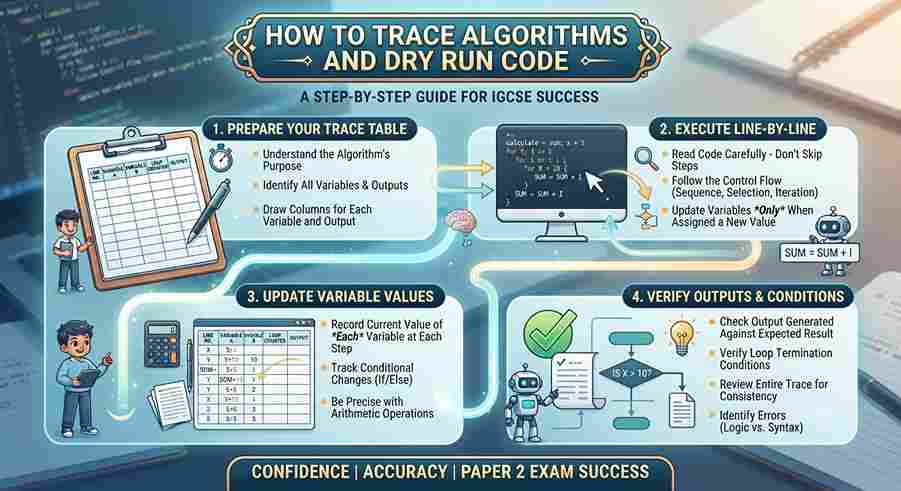
Step-by-Step Methodology for Tracing:
- Set Up Your Columns: List every variable declared in the algorithm as a column header in the exact order of initialization.
- Track Initialization: Write down the starting values assigned to variables before any loops or conditional statements execute.
- Execute Line-by-Line (Never Skip Steps): Follow the instruction pointer sequentially. When a variable changes value, cross out the old value (or write the new value directly in the next row) rather than erasing.
- Evaluate Boolean Conditions Carefully: For
WHILE,FOR, orIFstatements, write out the boolean evaluation (e.g.,5 < 10evaluates toTRUE) before deciding whether to enter the loop body. - Capture Output Explicitly: Whenever an
OUTPUT,PRINT, orSEND TO DISPLAYcommand is executed, write the exact text or number in the output column.
Part 3: A Worked Example — Tracing a Nested Loop and Array Search
Let us walk through a typical IGCSE Paper 2 trace table question involving arrays, loops, and conditional checks.
Exam-Style Pseudocode Snippet:
Plaintext
01  DECLARE Score : ARRAY[1:3] OF INTEGER
02  Score[1] <- 12
03  Score[2] <- 25
04  Score[3] <- 18
05  DECLARE Max : INTEGER
06  DECLARE Index : INTEGER
07  Max <- Score[1]
08  Index <- 1
09  FOR i <- 2 TO 3
10      IF Score[i] > Max THEN
11          Max <- Score[i]
12          Index <- i
13  ENDIF
14  NEXT i
15  OUTPUT "Highest score is ", Max, " at position ", Index
Step-by-Step Trace Execution:
- Lines 01–06: Array
Scoreis initialized with values[12, 25, 18].Maxis set to12.Indexis set to1. - Iteration 1 (
i = 2):- Check Line 10: Is
Score[2](25) $>$Max(12)? TRUE. - Update Line 11:
Maxbecomes25. - Update Line 12:
Indexbecomes2.
- Check Line 10: Is
- Iteration 2 (
i = 3):- Check Line 10: Is
Score[3](18) $>$Max(25)? FALSE. (Values remain unchanged).
- Check Line 10: Is
- Loop Termination: The loop ends.
- Line 15 Output:
Highest score is 25 at position 2
Resulting Trace Table Structure:
| i | Score[1] | Score[2] | Score[3] | Max | Index | OUTPUT |
| - | 12 | 25 | 18 | 12 | 1 | |
| 2 | 12 | 25 | 18 | 25 | 2 | |
| 3 | 12 | 25 | 18 | 25 | 2 | |
| Highest score is 25 at position 2 |
Part 4: Top 4 Traps That Cost IGCSE Computer Science Marks
- Miscounting Loop Boundaries (
FORvs.WHILE):- In a
FOR i <- 1 TO 5loop, remember that the loop executes for $i = 1, 2, 3, 4, 5$ (5 total iterations). - In a
WHILEloop, students often forget to update the loop counter inside the loop body, leading to infinite loop confusion or missing the final termination check.
- In a
- Confusing Array Indexing (0-based vs. 1-based):
- Cambridge IGCSE pseudocode standard uses 1-based indexing (e.g.,
Score[1]is the first element). Python uses 0-based indexing. Always check the array declaration bounds provided in the exam prompt (e.g.,ARRAY[0:2]vsARRAY[1:3]).
- Cambridge IGCSE pseudocode standard uses 1-based indexing (e.g.,
- Forgetting Variable Scope and Initialization: Failing to note when a variable is reset inside a nested loop versus when its value accumulates across iterations.
- Messy Handwriting in Trace Tables: Examiners cannot award marks if your numbers overlap or if it is impossible to determine which row a variable change belongs to. Keep your rows strictly aligned with a ruler if necessary.
Struggling with IGCSE Computer Science pseudocode, trace tables, or 2D array logic? EdFlik connects international school students globally with expert, 1-to-1 online computer science tutors, helping you master programming fundamentals and secure top $A^$ grades.*Book a Free Demo Class Today!
Frequently Asked Questions (FAQs)
Q1: What is the difference between pseudocode and programming languages like Python in Paper 2?
Ans: Pseudocode is an informal, structured English-like way of describing an algorithm without strict syntax rules, whereas Python or Visual Basic requires precise syntax. Cambridge IGCSE Paper 2 uses standardized pseudocode (e.g., INPUT, OUTPUT, <-, CASE OF), which is detailed in the syllabus reference guide.
Q2: How should I correct a mistake in a trace table during an exam?
Ans: Neatly draw a single horizontal line through the incorrect value and write the correct value directly above or beside it. Do not scribble out the entire table, as examiners need to see your working process.
Q3: Are trace tables only used for loops?
Ans: No. Trace tables can test sequential code, subroutines (functions and procedures), parameter passing, string manipulation functions, and conditional branching (IF-THEN-ELSE and CASE statements).
Q4: How does EdFlik support IGCSE Computer Science students?
Ans: EdFlik connects international school students worldwide with vetted, expert 1-to-1 online computer science tutors specializing in Cambridge IGCSE, Edexcel, and IB MYP/DP curricula. Our personalized sessions focus on practical coding logic, trace table drills, and past-paper mastery.