
Mastering GDC Calculator Shortcuts for IB Math AI: Statistics and Matrices Masterclass
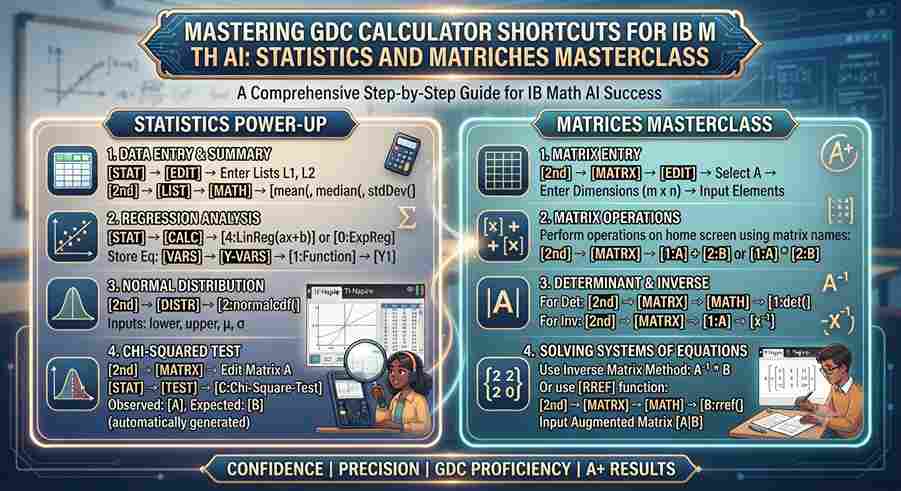
Last Updated: October 2026 | By EdFlik Education Team
For students enrolled in the IB Diploma Programme (IBDP) Mathematics: Analysis and Approaches (AA) or Applications and Interpretation (AI), the Graphing Display Calculator (GDC)—typically a TI-Nspire CX II, TI-84 Plus CE, or Casio fx-CG50—is not merely an optional accessory; it is your most powerful tactical weapon in Paper 2.
While the AA course emphasizes theoretical algebraic derivations, the Math AI course is explicitly designed around real-world modeling, data analysis, and technological proficiency. In Paper 2, high-yield questions on bivariate statistics, $\chi^2$ goodness-of-fit and independence tests, normal distributions, and matrix operations can be solved in seconds or minutes—provided you know the exact button sequences. Manually calculating a $3 \times 3$ matrix inverse or working out summary statistics for a dataset of 50 values during an exam is a recipe for catastrophic time wastage.
In this comprehensive, exam-focused masterclass guide, our expert mathematics educators break down the essential GDC calculator shortcuts for statistics and matrices, providing step-by-step keystroke frameworks to help you secure a top grade $7$.
Part 1: The TI-Nspire / TI-84 Statistics Shortcut Arsenal
Statistical analysis questions appear in virtually every IB Math AI Paper 2 exam. Whether you are dealing with univariate summary statistics, regression lines, or hypothesis testing, mastering menu navigation is vital.
1. Entering Data and Finding Univariate Statistics ($\bar{x}, s_x, \sum x, \sum x^2$)
Never compute mean, standard deviation, or quartiles by hand.
- TI-Nspire CX II Step-by-Step:
- Open a Lists & Spreadsheet application.
- Label Column A as
x(typexin the top formula cell). - Input your raw data values down Column A.
- Press
Menu$\rightarrow$Statistics$\rightarrow$Stat Calculations$\rightarrow$1-Variable Statistics. - Set Number of Lists to
1, selectxfor X1 List, and pressEnter. - Read off your results instantly: $\bar{x}$ (mean), $s_x$ (sample standard deviation), $\sigma x$ (population standard deviation), $\sum x$, $\sum x^2$, minimum, $Q_1$, Median, $Q_3$, and maximum.
- Exam Pro-Tip: Always verify whether the question asks for sample standard deviation ($s_x$) or population standard deviation ($\sigma_x$). Using the wrong value will instantly drop marks.
2. Bivariate Statistics and Linear Regression ($y = mx + c$)
When asked to find the line of best fit, Pearson's product-moment correlation coefficient ($r$), or the coefficient of determination ($R^2$):
- TI-Nspire CX II Step-by-Step:
- In your Lists & Spreadsheet app, label Column A as
xand Column B asy. - Input your independent data into
xand dependent data intoy. - Press
Menu$\rightarrow$Statistics$\rightarrow$Stat Calculations$\rightarrow$Linear Regression (mx + b). - Set X List to
xand Y List toy. PressEnter. - The calculator outputs $m$ (gradient), $b$ (y-intercept), $r^2$, and $r$ (correlation coefficient).
- In your Lists & Spreadsheet app, label Column A as
3. Chi-Squared ($\chi^2$) Tests for Independence and Goodness-of-Fit
Performing manual expected frequency calculations and $\chi^2$ sums for a $4 \times 3$ contingency table in an exam is nearly impossible within time limits.
- TI-Nspire CX II Step-by-Step (Matrix Contingency Table):
- Open a Calculator page.
- Press
Menu$\rightarrow$Matrix & Vector$\rightarrow$Create$\rightarrow$Matrix. Set rows and columns to match your contingency table (e.g., $3$ rows, $4$ columns) and populate the observed frequency values. Store this matrix as variableobs. - Press
Menu$\rightarrow$Statistics$\rightarrow$Stat Tests$\rightarrow$$\chi^2$ 2-Way Test... - Select your observed matrix
obs. The calculator instantly outputs the $\chi^2$ test statistic, the $p$-value, the degrees of freedom ($\text{df}$), and generates the expected frequency matrix (exp).
Part 2: Matrix Operations and Transformations Masterclass
Matrices in Math AI (especially HL, but also core applications) test transformations, system of linear equations, and transition matrices (Markov chains).
1. Creating and Storing Matrices
- TI-Nspire CX II Step-by-Step:
- On a Calculator page, press the Template button (next to the 9 key) and select the matrix icon, or press
Menu$\rightarrow$Matrix & Vector$\rightarrow$Create$\rightarrow$Matrix. - Enter the desired number of rows and columns.
- Fill in the elements and store the matrix by pressing
STO>(Ctrl +var) and naming it (e.g.,A).
- On a Calculator page, press the Template button (next to the 9 key) and select the matrix icon, or press
2. Calculating Determinants and Inverses
- Determinant: Type
det(A)and press Enter. - Matrix Inverse: Type
A^-1and press Enter. (If $\det(A) = 0$, the calculator will return "Error: Singular matrix", telling you immediately that the inverse does not exist).
3. Solving Systems of Linear Equations Using Matrices
When presented with a system of simultaneous equations:
$$\begin{aligned} 2x + 3y - z &= 5 \\ x - y + 2z &= -3 \\ 3x + 2y + 4z &= 11 \end{aligned}$$
Instead of manual elimination:
- Express as matrix equation $AX = B$.
- On your GDC, type
A^-1 * B(or uselinsolvecommand:linsolve(2*x + 3*y - z = 5 and x - y + 2*z = -3 and 3*x + 2*y + 4*z = 11, {x, y, z})). - Read the exact solutions for $x$, $y$, and $z$ in seconds.
Part 3: Top 4 Calculator Traps That Cost IB Math Marks
- Radian vs. Degree Mode Failures: While statistics and matrices don't rely heavily on angle modes, forgetting to switch your GDC back to Radians during calculus or trig modeling questions immediately following a statistics section will ruin your score. Always double-check your calculator header bar (
RADvsDEG). - Incorrect Floating-Point Rounding Settings: Leaving your GDC set to "Float" without knowing how to round properly, or conversely, locking your calculator to
Fix 2when intermediate steps require 4 or 5 significant figures. IB standard requires final answers to 3 significant figures, but intermediate calculations must retain full GDC precision. - Entering Raw Data vs. Summary Statistics Incorrectly: Selecting 1-Var Stats on summary frequencies without checking if frequency lists are correctly mapped. If your data has a frequency table, ensure you specify the frequency list column, not just the data column.
- Syntax Errors in Matrix Multiplication: Forgetting that matrix multiplication is non-commutative ($AB \neq BA$) and requires inner dimension matching. Entering dimensions incorrectly during matrix creation will trigger syntax faults.
Struggling with IB Math AI Paper 2 GDC workflows, complex statistical modeling, or past-paper problem sets? EdFlik connects international school students globally with expert, 1-to-1 online mathematics tutors, helping you master calculator shortcuts and secure top Grade 7 outcomes.Book a Free Demo Class Today!
Frequently Asked Questions (FAQs)
Q1: Which graphing calculator is best for IB Math AI?
Ans: The TI-Nspire CX II (Non-CAS) is widely considered the gold standard for IB Math AI because of its intuitive menus, spreadsheet functionality, and robust statistical testing suites. The Casio fx-CG50 is also extremely popular and fully approved by IB.
Q2: Are CAS (Computer Algebra System) calculators allowed in IB exams?
Ans: No. CAS calculators (such as the TI-Nspire CX II CAS) which perform symbolic algebra automatically are strictly prohibited in IB examinations. You must use non-CAS versions (e.g., TI-Nspire CX II).
Q3: Can I rely entirely on my GDC for Paper 2 without showing working?
Ans: Absolutely not! IB mark schemes explicitly state that calculator answers without method or formula setup will lose marks if the final answer is incorrect. Always write down your calculator command inputs (e.g., "Using GDC: LinReg $y = mx + c$") and parameter values as your working.
Q4: How does EdFlik support IB Mathematics students?
Ans: EdFlik connects international school students worldwide with vetted, expert 1-to-1 online math tutors specializing in IB Math AI and AA (SL/HL). Our personalized sessions focus on mastering GDC shortcuts, tackling difficult Paper 2 problem types, and exam time-management strategies.