10 Hidden Desmos Calculator Hacks That Solve Digital SAT Algebra Problems Instantly
Last Updated: October 2026 | By EdFlik Education Team
For high school students preparing to take the Digital SAT—whether testing at international centers across Dubai, Abu Dhabi, or worldwide—the single greatest technical advantage you possess is the built-in Desmos graphing calculator embedded directly into the testing platform.
While students in past generations spent precious minutes factoring quadratic equations by hand, expanding polynomials, solving simultaneous linear systems through substitution, or manipulating radical expressions, today's top-scoring students let Desmos do the heavy lifting in seconds. However, simply knowing how to type a basic equation into Desmos is not enough. To break into the 750–800 Math score bracket, you need to master advanced, counter-intuitive "hidden hacks" that turn complex algebraic word problems into visual lookups.
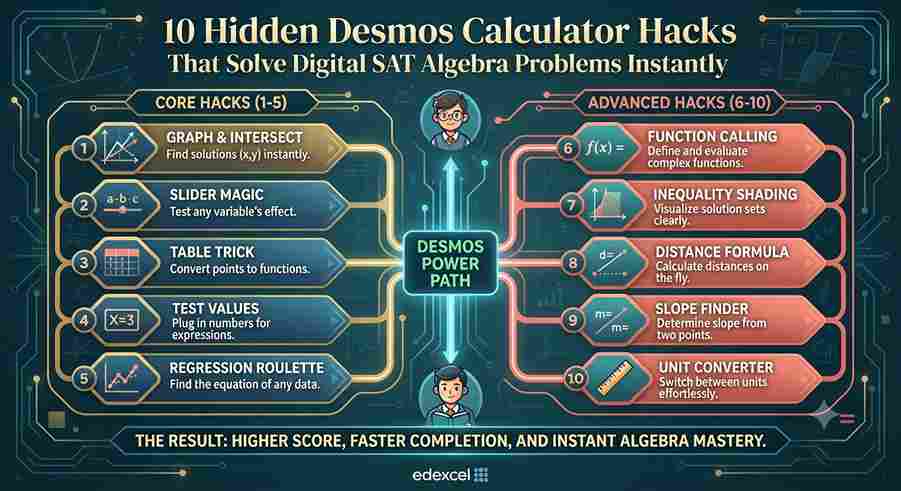
In this comprehensive, exam-focused masterclass guide, our expert test-prep strategists reveal 10 hidden Desmos calculator hacks that solve Digital SAT algebra and advanced math problems instantly.
Hack 1: The Magic Letter Trick (Solving for Unknown Constants)
When an SAT problem gives you an equation with an unknown constant (such as $k$ or $c$) and asks for its value given a specific condition (e.g., “has infinitely many solutions” or “intersects at exactly one point”), do not waste time doing algebraic expansion.
- The Desmos Hack: Type the equation directly into Desmos using $k$ (or any letter) as a variable. Desmos will immediately prompt you: "Add slider: k".
- Execution: Click the play button or manually drag the slider for $k$ until the graph satisfies the condition described in the prompt (e.g., lines overlapping for infinite solutions or touching at a single vertex). The exact value of $k$ is revealed instantly.
Hack 2: Instant Simultaneous Equations via Intersection
Solving a system of linear or nonlinear equations by hand can lead to careless arithmetic errors.
- The Desmos Hack: Enter both equations directly on separate lines (e.g., $y = 3x - 5$ and $2x + 4y = 20$).
- Execution: Do not solve algebraically. Simply look at the graph, click the intersection point where the two lines cross, and Desmos displays the exact coordinate pair $(x, y)$ instantly.
Hack 3: Regression Analysis for Exponential Word Problems
Exponential growth and decay word problems (population increase, radioactive half-life, compound interest) often require finding constants $a$ and $b$ from given data points.
- The Desmos Hack: Use Desmos’s built-in regression syntax. If a question states that at $t = 0$, $N = 150$ and at $t = 3$, $N = 1200$, type:$$\text{1.}\quad x_1 = [0, 3]$$$$\text{2.}\quad y_1 = [150, 1200]$$$$\text{3.}\quad y_1 \sim a \cdot b^{x_1}$$
- Execution: Desmos instantly calculates the exact values of $a$ and $b$ for your model, allowing you to evaluate any future value in seconds.
Hack 4: Finding Maximums and Minimums of Parabolas
Vertex form or standard form quadratic questions frequently ask for the maximum profit, minimum cost, or peak height of a projectile.
- The Desmos Hack: Type the quadratic function into Desmos (e.g., $f(x) = -16x^2 + 64x + 10$).
- Execution: Click on the graph. Desmos automatically highlights key features, including the $x$-intercepts, $y$-intercept, and the vertex. Click the peak vertex coordinate to read the maximum $y$-value instantly.
Hack 5: Solving Absolute Value Equations and Inequalities
Absolute value equations with nested expressions can be confusing to split into positive and negative cases manually.
- The Desmos Hack: Type the left side as one function ($y = \vert{}2x - 6\vert{}$), and the right side as another ($y = 4$).
- Execution: Find the intersection points on the graph. For inequalities (e.g., $\vert{}2x - 6\vert{} \le 4$), look at the interval on the $x$-axis where the V-shaped graph lies below the horizontal line $y = 4$.
Hack 6: Converting Fractions and Decimals Instantly
The Digital SAT frequently requires answers in improper fractions, mixed numbers, or simplified radicals, while your working might yield decimals.
- The Desmos Hack: Type any complex expression or arithmetic operation into a blank calculator line.
- Execution: Look to the far left of the expression output box. A small fraction toggle icon appears. Click it, and Desmos instantly converts any decimal answer into an exact, simplified fraction.
Hack 7: Testing Answer Choices ("Backsolving" in Desmos)
When a multiple-choice question asks you to solve for a variable or expression, and algebraic manipulation looks tedious, let Desmos test the options for you.
- The Desmos Hack: Define your target expression as a function or equation, and store variables or test values from options A, B, C, and D.
- Execution: Alternatively, graph the left side of an equation as $y_1$ and the right side as $y_2$, or graph each multiple-choice option as $x = \text{value}$ to see which one creates a valid equality.
Hack 8: Evaluating Polynomial Roots and Factors
Finding the roots (zeros) of a cubic or quartic polynomial by hand requires factoring by grouping or synthetic division.
- The Desmos Hack: Type the polynomial equation into Desmos (e.g., $y = x^3 - 6x^2 + 11x - 6$).
- Execution: Look at the $x$-axis intercepts. Desmos highlights them in grey. Click each intercept to see the exact root values ($x = 1, 2, 3$), telling you instantly that the factors are $(x-1)(x-2)(x-3)$.
Hack 9: Function Evaluation ($f(x)$ Substitution)
When a question asks you to evaluate $f(5)$ given a complex piecewise or rational function, students often make substitution errors.
- The Desmos Hack: Define the function properly in line one by typing
f(x) = x^3 - 4x + 2. - Execution: In the very next line, simply type
f(5)orf(-2). Desmos computes the exact numerical output instantly without requiring manual arithmetic substitution.
Hack 10: Sliders for Parameter Exploration
If an abstract algebra question asks how changing a parameter $c$ affects the vertex or radius of a circle/parabola:
- The Desmos Hack: Type the equation using parameter letters like $a$, $b$, or $c$, letting Desmos create sliders.
- Execution: Manually slide the parameter back and forth or animate the slider to watch the graph shift, expand, or contract in real time, giving you immediate visual confirmation of the correct algebraic property.
Top 4 Traps When Using Desmos on the SAT
- Typing Syntax Errors: Forgetting multiplication signs (e.g., typing
3xinstead of3*xwhen combining function definitions) or misplacing parentheses in fractions. - Zooming Out Too Far: Getting lost on the Cartesian plane. If your graph disappears, click the Home (magnifying glass with house) button on the right side of Desmos to reset the standard viewing window.
- Ignoring Degree vs. Radian Mode: For trigonometry questions involving sine and cosine, check the wrench settings menu in the top right of Desmos to ensure your calculator is set to the correct angle mode (Degrees or Radians).
- Relying Solely on Calculator Without Understanding Concepts: Desmos is a powerful verification tool, but rushing to graph every single question without basic algebraic intuition can waste valuable time on lengthy input entry.
Preparing for the Digital SAT and aiming for a top Math score? EdFlik connects international school students globally with expert, 1-to-1 online SAT tutors, helping you master Desmos shortcuts, eliminate algebra errors, and execute winning test-day strategies. Book a Free Demo Class Today!
Frequently Asked Questions (FAQs)
Q1: Can I use Desmos on both Math modules of the Digital SAT?
Ans: Yes! The Desmos graphing calculator is available on your screen for the entire duration of the Math section across both Module 1 and Module 2.
Q2: Is the built-in Desmos calculator identical to the online version?
Ans: Yes, the testing platform embeds the standard Desmos graphing calculator (non-CAS version). Practicing on desmos.com/calculator in advance is one of the best ways to build muscle memory.
Q3: Are there any math questions on the SAT where Desmos won't work?
Ans: Desmos is exceptionally powerful for algebra, functions, and coordinate geometry. However, pure conceptual questions (such as properties of exponents proofs or abstract word problem setups) still require careful reading and logical setup.
Q4: How does EdFlik support Digital SAT Math preparation?
Ans: EdFlik connects international school students worldwide with vetted, expert 1-to-1 online SAT tutors. Our personalized coaching focuses on mastering Desmos shortcuts, diagnosing weak topic clusters, and building timed test-taking stamina.