Building Strong Coding Foundations: Essential Algorithm and Spreadsheet Skills for Year 8 Students
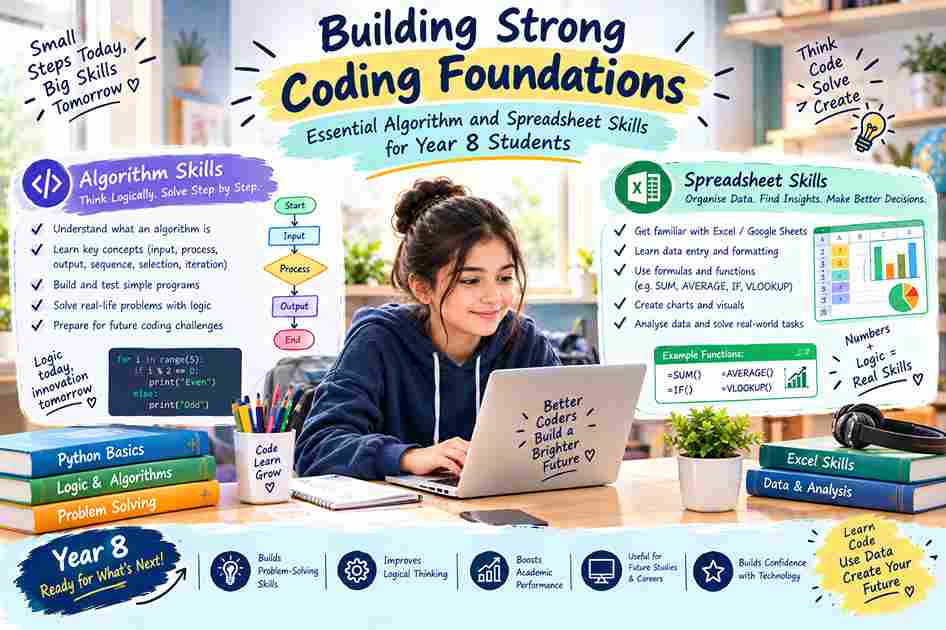
Last Updated: September 2026 | By EdFlik Education Team
As digital literacy transforms from a specialized elective into a core life skill, secondary school curricula across international schools—from Cambridge Lower Secondary to the IB Middle Years Programme (MYP)—place an increasingly heavy emphasis on computer science and data handling. For students in Year 8 (around ages 12–13), this represents a crucial developmental window.
Moving beyond basic block-based programming (like Scratch) into text-based coding logic and mastering advanced spreadsheet architecture gives Year 8 students the cognitive scaffolding they need for higher-level GCSE Computer Science, IAL Information Technology, or IB Design Technology.
In this comprehensive, in-depth guide, our expert computer science tutors break down the foundational coding logic and data management skills every Year 8 student must master to excel in their academic journey.
Part 1: Decoding Algorithms and Computational Thinking
Before writing a single line of Python or JavaScript, students must learn how to think like a computer scientist. Computational thinking is a problem-solving process that breaks down into four key pillars: Decomposition, Pattern Recognition, Abstraction, and Algorithmic Design.
1. Understanding Control Structures (The Building Blocks)
Every algorithm relies on three fundamental control structures that students must master:
- Sequence: Instructions executed step-by-step in the exact order they are written.
- Selection (Conditional Logic): Making decisions using
if,elif, andelsestatements. (e.g., If temperature > 30, display "Turn on AC", else display "Normal"). - Iteration (Loops): Automating repetitive tasks using
forloops (count-controlled) andwhileloops (condition-controlled).
2. Transitioning to Text-Based Coding (Python)
Year 8 is typically the year students transition from visual block coding to text-based syntax. Python is universally chosen as the ideal introductory language due to its readable syntax. Students should become comfortable with:
- Variables and Data Types: Declaring strings (
str), integers (int), floats (float), and booleans (bool). - User Input and Output: Using
input()to capture data andprint()to display results. - Debugging: Learning how to read syntax errors, runtime errors, and logic errors methodically rather than guessing fixes.
Part 2: Spreadsheet Mastery — Data Organization and Modeling
While coding handles logic and automation, spreadsheets (such as Microsoft Excel or Google Sheets) are the engines of data organization, financial modeling, and numerical analysis in the modern workplace.
1. Essential Formulas and Functions
Year 8 students must move beyond manual data entry into dynamic spreadsheet modeling:
- Basic Arithmetic Operations: Writing formulas using operators for addition (
+), subtraction (-), multiplication (*), division (/), and exponents (^). - Core Statistical Functions: Mastering
=SUM(),=AVERAGE(),=MAX(),=MIN(), and=COUNT(). - Logical Functions: Utilizing
=IF()statements to automate decision-making inside data sets (e.g., evaluating whether a student passed a test:=IF(B2>=50, "Pass", "Fail")).
2. Data Visualization (Charts and Graphs)
Numbers in a table can be overwhelming; visual representation brings data to life. Students should learn when to deploy specific chart types:
- Column/Bar Charts: Best for comparing discrete categories of data.
- Line Graphs: Essential for showing trends over time (chronological data).
- Pie Charts: Useful for showing proportions or percentages of a whole.
Part 3: Top 4 Strategies to Help Year 8 Students Excel in Computing
- Practice Flowcharts Before Coding: When presented with a complex problem, encourage students to map out their logic using flowcharts (rectangles for processes, diamonds for decisions) before touching a keyboard. This eliminates messy trial-and-error coding.
- Gamify Coding Practice: Utilize interactive platforms like Codecademy, HackerRank (Junior tracks), or Python-based mini-game projects to keep engagement high and reinforce syntax memory.
- Build Real-World Spreadsheet Models: Have students build practical household budgets, pocket-money trackers, or sports tournament league tables using spreadsheets. Seeing formulas calculate real data makes learning stick.
- Embrace Errors as Learning Opportunities: Debugging is where real learning happens. Teach students to read error messages carefully rather than panicking when their code fails on the first run.
Struggling to help your Year 8 student grasp coding logic, Python syntax, or advanced spreadsheet formulas? EdFlik offers expert, 1-to-1 online tutoring customized specifically for international lower-secondary curricula, helping students build computational confidence and technical fluency.Book a Free Demo Class Today!
Frequently Asked Questions (FAQs)
Q1: Why is Python recommended over other programming languages for Year 8 students?
Ans: Python uses clean, English-like syntax that closely resembles pseudocode. This allows students to focus on mastering core programming logic (like loops and conditionals) without getting bogged down by complicated punctuation or strict bracket rules found in languages like C++ or Java.
Q2: What is the difference between relative and absolute cell references in spreadsheets?
Ans: A relative reference (e.g., A1) changes when a formula is copied to another cell. An absolute reference (e.g., $A$1) stays locked onto a specific cell even when the formula is dragged across rows or columns, which is crucial for referencing fixed tax rates or discount percentages.
Q3: How do computer science skills help with other school subjects?
Ans: Computational thinking fosters logical problem-solving, pattern recognition, and structured decomposition—skills that directly improve performance in mathematics, science experimental design, and data analysis tasks across the curriculum.
Q4: How can EdFlik help my child succeed in lower-secondary computing?
Ans: EdFlik connects students with experienced, certified 1-to-1 online tutors specializing in computer science and digital literacy. Our tutors guide students through hands-on coding projects, spreadsheet modeling, and algorithmic problem-solving in a supportive, engaging environment.